New Finds
The compact electronics cleaning tool: choose a device-approved task
Archive date: September 6, 2026 at 9:22 am ET
First published
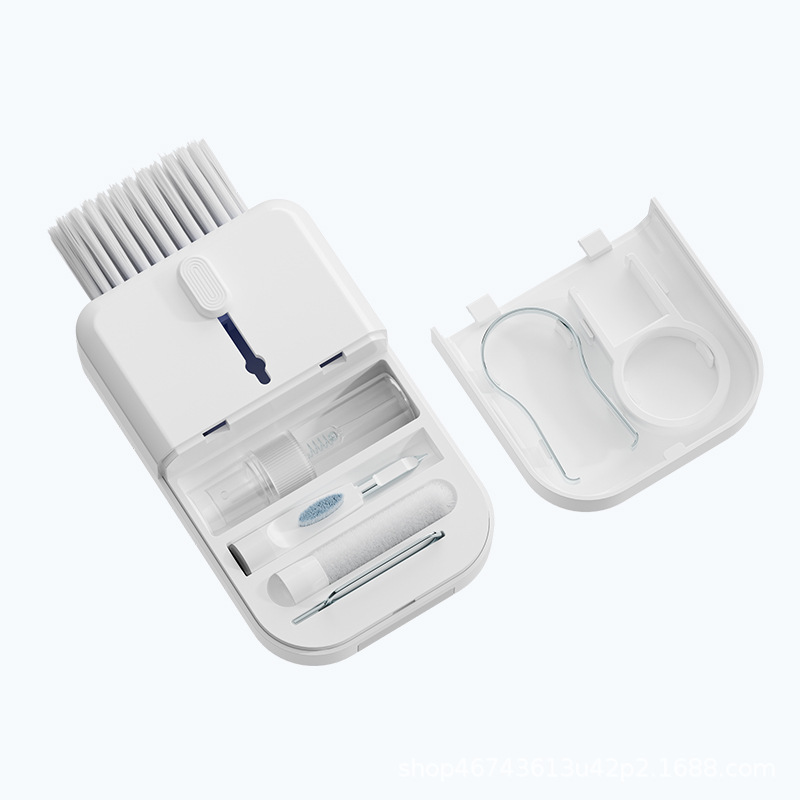
A small multi-part cleaning tool is useful only when its tips suit the equipment you own. Start with the device manufacturer’s instructions before deciding which surface to clean. The accessory is not a repair tool or proof of compatibility with every screen, coating or port.
Inspect the hard-to-reach area
Identify the debris and check whether a brush can reach it without catching a key or damaging a surface. Do not add liquids or push a tip into an opening simply because a product photograph suggests a detailed cleaning routine.
Write down the permitted cleaning method
Find the instructions for the exact device model and identify the surface you intend to clean. Match the tool to that method. If a tip or cleaner is not clearly suitable, use the maker’s recommended approach rather than experimenting on the device.
Selections from our collection

A compact accessory for suitable keyboard and electronics cleaning
Compact Electronics Cleaning Tool — White
One compact multi-part cleaning tool for keyboards and small electronic accessories. Devices are not included. Follow your device manufacturer's cleaning guidance.
Prices shown are current item prices in USD. Check the product and checkout for availability, shipping and the full order total. Styled accessories are included only when the listing says so.
Keep the job narrow
Follow the equipment maker’s instructions for power and handling. The listing does not establish disinfection or restoration of damaged contacts. Devices shown in styling are not included with the tool.
Who this suits
Choose the accessory for a confirmed maintenance task, with the device instructions in charge.
Sources and product information
The specifications and included-item details in this guide come from these store listings, checked October 29, 2026. They are listed product information, not independent test results.